

Theme architecture sets your baseline Core Web Vitals score before any plugin runs. Fast themes load minimal CSS, skip jQuery by default and load feature scripts only on the pages that use them. A lightweight theme starts faster than caching or a CDN can ever make a heavy one.
Key Takeaways
- Google ranks pages partly on Core Web Vitals: LCP, INP and CLS
- Architecture decides your baseline speed more than hosting does
- GeneratePress installs under 10KB while a bloated multipurpose theme can pass 300KB
- Six factors split fast themes from slow ones: JavaScript strategy, CSS delivery and conditional loading lead the list
- A fast theme hands you a better Core Web Vitals baseline before a single plugin loads
Your theme is the largest controllable factor in your site’s baseline performance. Hosting and caching plugins can improve a slow theme. Neither can fix bad architecture. A theme that starts heavy stays heavy.
Google confirmed Core Web Vitals as ranking signals back in 2021. Your theme sets the starting score on all three metrics: LCP, INP and CLS.
What Are Core Web Vitals and Why Your Theme Affects Them
Core Web Vitals are three page experience metrics Google uses inside its ranking systems. Each one measures a different part of how a page performs for real users.
LCP (Largest Contentful Paint) measures how fast the largest visible element renders on screen. That element is usually a hero image or a heading. Google rates anything under 2.5 seconds as good. Render blocking scripts, external font requests and unoptimized hero images all push LCP higher.
INP (Interaction to Next Paint) measures how quickly the page responds to user input. That covers clicks, taps and keyboard entry. INP replaced FID in 2024. Themes that load heavy JavaScript frameworks drive INP up. Google rates anything under 200 milliseconds as good.
CLS (Cumulative Layout Shift) measures how much the layout shifts unexpectedly during loading. A score of 0.1 or lower rates as good. Themes that fail to reserve space for images or sliders before they render cause visible jumps. Those jumps hurt user experience and ranking alike.
Your theme’s code decides how all three behave on a clean install. Every plugin and asset you stack on top moves them further.
The 6 Technical Factors That Separate Fast Themes from Slow Ones
1. JavaScript Loading Strategy
Fast themes load JavaScript only when a page needs it. Slow themes queue scripts globally. A slider script or a modal script then loads on every page even when nothing on that page uses it.
The move from jQuery to vanilla JavaScript matters here. jQuery adds roughly 30KB to 90KB of blocking script. Themes that dropped the jQuery dependency produce near zero Total Blocking Time on clean installs. Current GeneratePress, Neve and Kadence builds all sit in that group.
Look for themes that defer scripts not needed for first render. Conditional feature scripts beat site wide loading every time.
2. CSS Delivery and File Size
A lean stylesheet loads faster than a bloated one. Some multipurpose themes ship stylesheets over 200KB because they bundle CSS for every possible feature. You carry that weight even for features you never switch on.
Fast themes load minimal CSS by default. Feature styles load only when a feature is active. GeneratePress ships with roughly 6KB to 15KB of base CSS. Themes that lean hard on a page builder can load 300KB or more before any content goes in.
Look for a small base CSS file and support for critical CSS extraction.
3. Web Font Handling
Every external font file is a separate request that can delay rendering. Google Fonts needs a DNS lookup then a connection then a download before text appears. That delay shows up as a flash of invisible text or a flash of unstyled text. Both events hurt CLS and user experience.
Fast themes default to system fonts and make zero font requests. Others add font-display: swap so text stays visible during load.
Look for system font defaults, self hosted fonts or a swap strategy.
4. Image Loading Behavior
Themes without native lazy loading load every image at render time. That includes images far below the fold a visitor may never reach. The result is a slower first paint and a heavier page.
Modern themes set the HTML loading="lazy" attribute on images. These themes also set width and height on each image so the browser reserves space. That reserved space prevents the layout shift that drives CLS.
Look for native lazy loading, explicit image dimensions and WebP support.
5. Render Blocking Resources
A render blocking resource is any script or stylesheet the browser must load before it shows content. Each one delays the moment a visitor sees something on screen. That delay hits LCP and perceived speed directly.
Fast themes keep these resources low. The theme defers scripts, inlines critical CSS and skips synchronous external calls.
6. Feature Loading Model
Multipurpose themes often pack in dozens of features. Sliders, mega menus and countdown timers all ship in one bundle. The theme then loads resources for all of them on every page whether or not you use the feature.
Fast themes load feature resources conditionally. A countdown script stays off any page without a countdown. The mega menu adds no CSS until you switch it on.
Conditional loading is the largest architectural gap between lightweight frameworks and bloated multipurpose themes. The gap is also the hardest part to spot from outside. You have to inspect what actually loads on a real page.
How Theme Architecture Affects Each Core Web Vitals Metric
| Factor | Affects LCP | Affects INP | Affects CLS |
|---|---|---|---|
| Render blocking scripts | Yes | Yes | No |
| External fonts | Yes | No | Yes (FOIT) |
| Image lazy loading | No | No | Yes |
| Image dimensions set | No | No | Yes |
| Heavy JavaScript | Indirectly | Yes | No |
| Large CSS files | Yes | No | No |
| Global feature scripts | Yes | Yes | No |
A lean lightweight theme improves your baseline across all three metrics. That gain lands before you add a single plugin or page of content.
What “Lightweight” Actually Means
Theme marketing uses lightweight loosely. Here is what the word should mean in practice.
- Page size under 100KB on a clean install. The fastest themes install at 10KB to 50KB. A theme calling itself lightweight at 1MB to 2MB is stretching the word.
- Single digit HTTP requests on a clean install. Each external request adds latency. Fast themes make 3 to 7 requests on a clean install while heavy themes make 20 to 40.
- No jQuery by default. A theme loading jQuery globally with no jQuery feature in use wastes 30KB to 90KB of blocking script.
- Conditional feature loading. Features and their resources load only on the pages that use them.
- Active development. A theme left without updates for 12 months or more may skip current WordPress performance APIs. Those APIs cover lazy loading, WebP and INP work.
How Spexo and Other Lightweight Themes Compare
Most fast theme conversations name the same few options. GeneratePress, Neve and Kadence lead on raw clean install scores. Astra sits close behind across most tests. The Spexo theme takes a different route built for Elementor users.
Spexo is a free WordPress theme built around Elementor and the Spexo Addons widget set. The theme loads widget assets conditionally so a page pulls only the scripts its widgets need. That model keeps the base footprint small while you still build with a full widget library.
| Theme | Speed approach | Best fit |
|---|---|---|
| GeneratePress | Base CSS under 10KB, no jQuery by default | Developers who want a lean blank base |
| Neve | Light base with conditional scripts | Small business and blog sites |
| Kadence | Modular blocks with conditional assets | Block editor builds |
| Astra | Small core with optional modules | General multipurpose sites |
| Spexo | Conditional Elementor widget loading, free | Elementor users who want widgets without bloat |
The right pick depends on how you build. Choose GeneratePress or a block theme for a code first workflow. Choose Spexo when you build with Elementor and want widget features without a heavy global bundle. You can grab the free Spexo theme and test it against your current build.
How to Check a Theme’s Performance Before You Install It
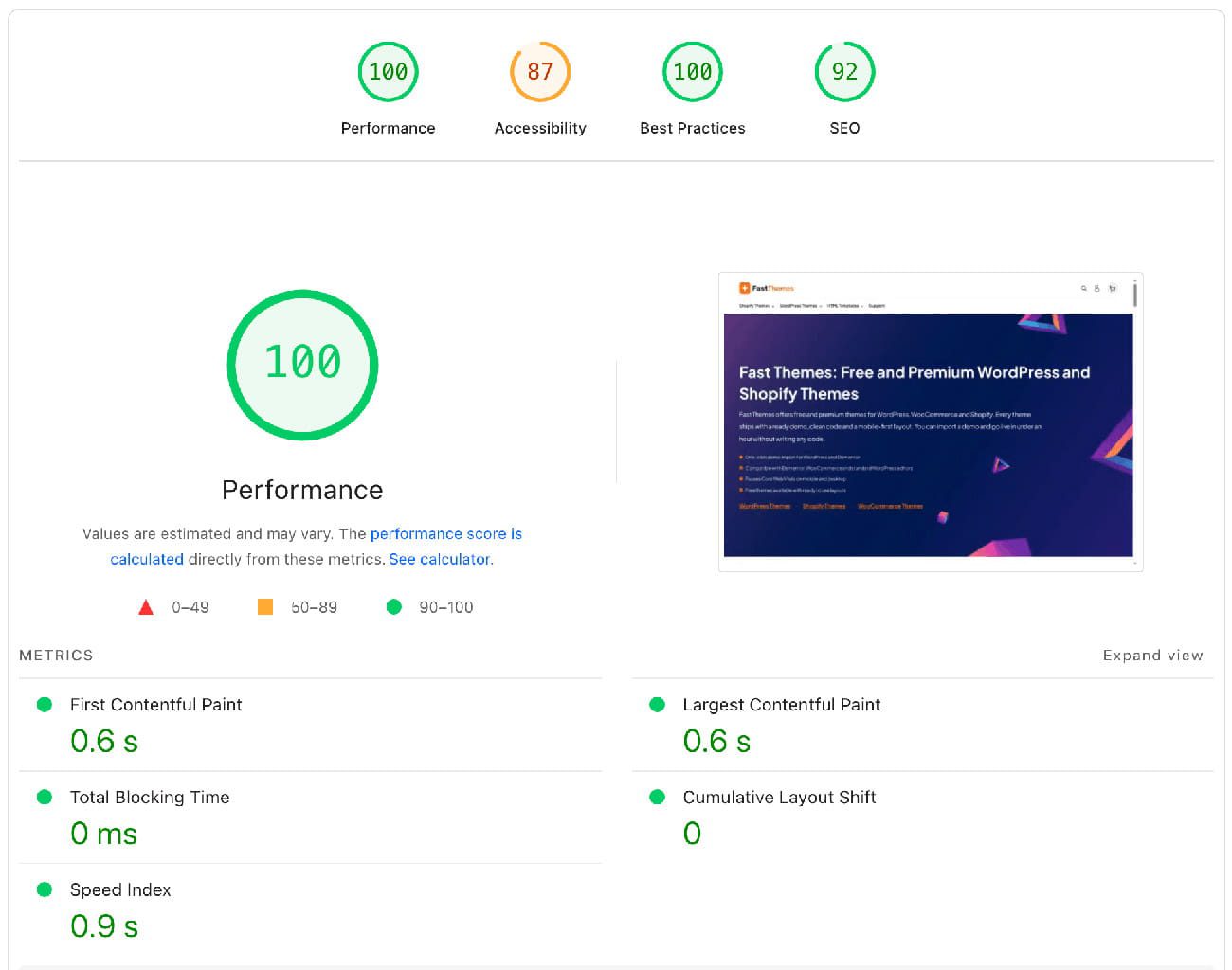
You can estimate a theme’s speed before you install it. A few checks on the demo site tell you most of what you need.
- Run PageSpeed Insights on the demo. Theme demos are idealized and run no third party plugins. The score still reflects the underlying architecture. A mobile demo under 80 points to real weight problems while a demo at 90 or above means a solid foundation.
- Inspect network requests. Open Chrome DevTools then the Network tab on the demo homepage. Over 500KB or over 30 requests on an empty demo is a warning sign.
- Search the source for jQuery. View the page source then find jQuery in it. A theme loading jQuery globally with no jQuery feature in sight handles conditional loading poorly.
- Read the changelog. A theme updated in the last three months is actively maintained. Anything last touched 18 months ago may clash with current WordPress versions.
Why a Fast Theme Is the Right Starting Point
You can speed up a slow site with caching, image work and a CDN. You still fight the theme’s baseline the whole way. A heavy theme needs more effort to reach good Core Web Vitals. The lightweight option often wins that race with no tuning at all.
See the Fastest WordPress Themes roundup to compare the top performers side by side.
Choosing a fast theme at the start avoids the rebuild that follows a slow one. For stores running WooCommerce the architecture matters even more because product pages carry additional queries and scripts. The WooCommerce themes for online stores collection is built with that overhead in mind.
Frequently Asked Questions
No. A fast theme gives you a better starting point. Plugins, images and hosting quality still shape the final result. Load a fast theme with heavy scripts and a large slider and it scores worse than its clean baseline.
The Spexo theme loads Elementor widget assets conditionally so each page pulls only what it uses. That approach keeps the footprint low while you build with the full Spexo Addons widget set. The theme suits Elementor users who want speed without dropping the page builder.
On clean installs GeneratePress, Neve and Twenty Twenty-Five post near perfect Core Web Vitals scores. GeneratePress tends to produce near zero CLS with sub one second LCP and low INP. Real world scores still depend on how you build the site.
To a point. Caching, image work and script plugins can lift a slow theme’s scores. Themes with deep architectural bloat hit a ceiling those plugins cannot clear. Switching to a faster theme often beats tuning a slow one.
Hello Elementor installs at roughly 6KB of CSS. GeneratePress installs at under 10KB. Twenty Twenty-Five ships minimal CSS with no JavaScript framework dependency. These three sit among the leanest options in 2026.
Yes. Google uses Core Web Vitals as ranking signals across LCP, INP and CLS. Your theme sets the starting value for all three by shaping render speed, interaction response and layout stability. A faster theme beats a slower one on these signals when everything else is equal.